Flight Overhead Notifier - A Tiny macOS Menu Bar App
2026-07-17 by Nick Belvin
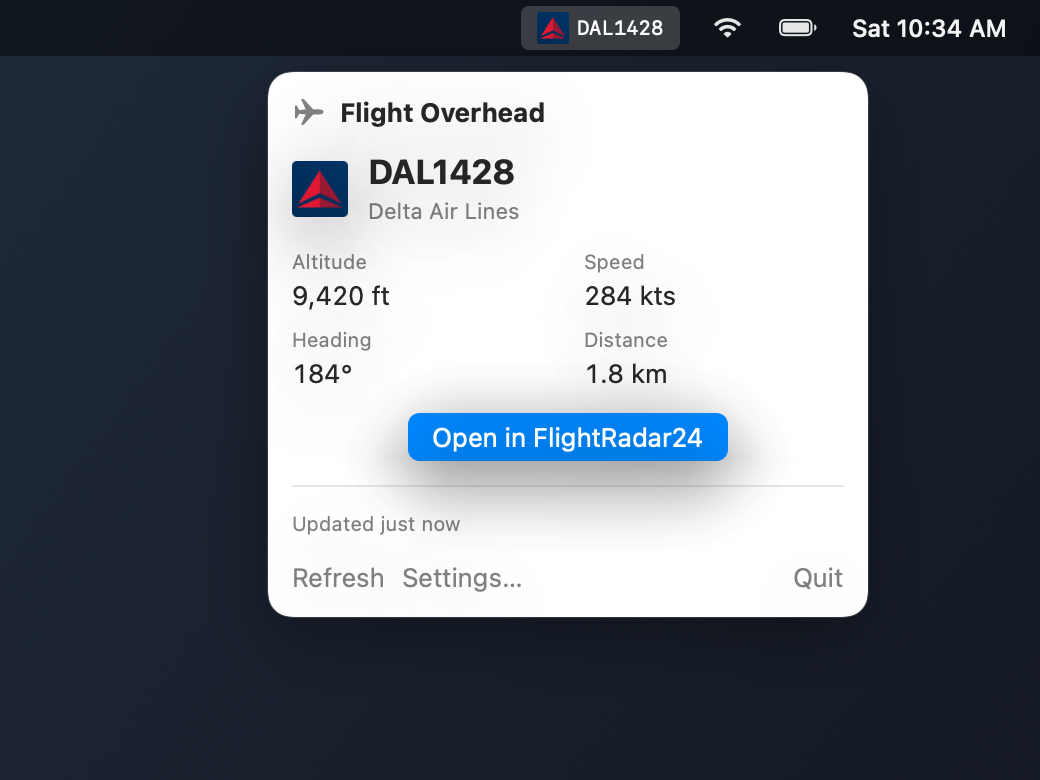
Any time a plane flies low over my house, I end up pulling out my phone and opening FlightRadar24 just to see where it's coming from. I wanted something way lazier: glance up at my macOS menu bar, see the callsign and airline logo, and only click through to FlightRadar24 if it actually looks interesting.
So I built Flight Overhead Notifier, a small SwiftUI MenuBarExtra app with no Dock icon.
How it works
- Figures out roughly where you are using CoreLocation (with an IP fallback or manual coordinates if needed).
- Polls the OpenSky Network REST API for live ADS-B state vectors in a bounding box around you.
- Filters out anything on the ground or above an optional altitude ceiling, runs a haversine distance check to find the closest aircraft within your radius (5 km by default), and updates the menu bar icon and text.
- Clicking Open in FlightRadar24 deep-links straight to that callsign (or falls back to the aircraft's ICAO24 hex address).
Cool challenges along the way
1. The "why does it think I'm in Boston?" location bug
This was easily the sneakiest bug I ran into. Initially, when the app started up for the first time, it requested CoreLocation permission and immediately called requestLocation() while authorizationStatus was still .notDetermined. Because the user hadn't clicked Allow yet, CoreLocation threw an error, and my failure handler immediately fell back to an IP geolocation lookup (ipapi.co). That placed me at an ISP hub hundreds of miles away instead of my actual neighborhood.
On top of that, a stationary Mac without GPS hardware often throws a transient kCLErrorLocationUnknown on its first fix. To fix it cleanly in LocationManager:
- Do nothing on
.notDeterminedand wait forlocationManagerDidChangeAuthorization. - Retry transient CoreLocation failures up to 4 times (2 seconds apart) before giving up and using the coarse IP lookup.
- Cancel any in-flight IP fallback the moment a real CoreLocation fix lands, and use
startMonitoringSignificantLocationChanges()instead of burning battery with continuous GPS.
Another macOS quirk: running the binary via swift run doesn't include an Info.plist with NSLocationWhenInUseUsageDescription, so macOS won't even show the CoreLocation permission prompt. I added a Scripts/build_app.sh script to wrap the release binary and SwiftPM resource bundle into an ad-hoc signed .app bundle with LSUIElement = true so it behaves like a real menu bar utility.
2. Staying friendly with OpenSky's anonymous rate limits
OpenSky's free anonymous API gives you a pretty tight request budget. My first pass polled every 15 seconds, which worked fine for a quick test and then promptly started hitting 429 rate-limit responses.
I bumped the default poll interval to 60 seconds (with a hard 10-second floor in AppConfig), added exponential backoff up to 120 seconds on 429s inside PollingCoordinator, and hooked into NSWorkspace sleep/wake notifications so the polling loop pauses whenever the Mac goes to sleep and kicks off a fresh check when it wakes up. To avoid missing planes right as they cross the edge of your circle, the bounding box query asks for 1.5x the configured detection radius (at least 4 km) before running the exact haversine filter locally.
3. Turning ATC callsigns into real airlines offline
OpenSky returns the air traffic control callsign (like DAL1428), not the airline name or icon. Rather than hitting another API on every poll, I bundled the OpenFlights airlines.csv dataset (~5,700 entries) directly into the app as a SwiftPM resource, wrote a quote-aware CSV parser in AirlineResolver to map the 3-letter ICAO prefix (DAL) to an airline name and 2-letter IATA code (DL), and fetch the 64px badge from Kiwi's logo CDN (with a plain SF Symbol airplane fallback when nothing matches).